As remote work becomes the norm, creating an ergonomic home office workstation is crucial. Research indicates that 60% of remote workers experience discomfort due to poor setup. This leads to decreased productivity and potential long-term health issues. Understanding "how to set up an ergonomic workstation at home" is more important than ever.
One study by the International Journal of Environmental Research and Public Health found that an optimally designed workspace can enhance employee well-being significantly. Proper chair height, monitor positioning, and keyboard placement are essential. For example, a chair that supports the lower back and prevents slouching can reduce fatigue.
However, many still face challenges in achieving an ideal workspace. Often, personal preferences clash with ergonomic guidelines. This inconsistency highlights the need for ongoing adjustments as comfort levels may vary. Creating an ergonomic workstation is not a one-size-fits-all approach; it requires continuous evaluation and adaptation.
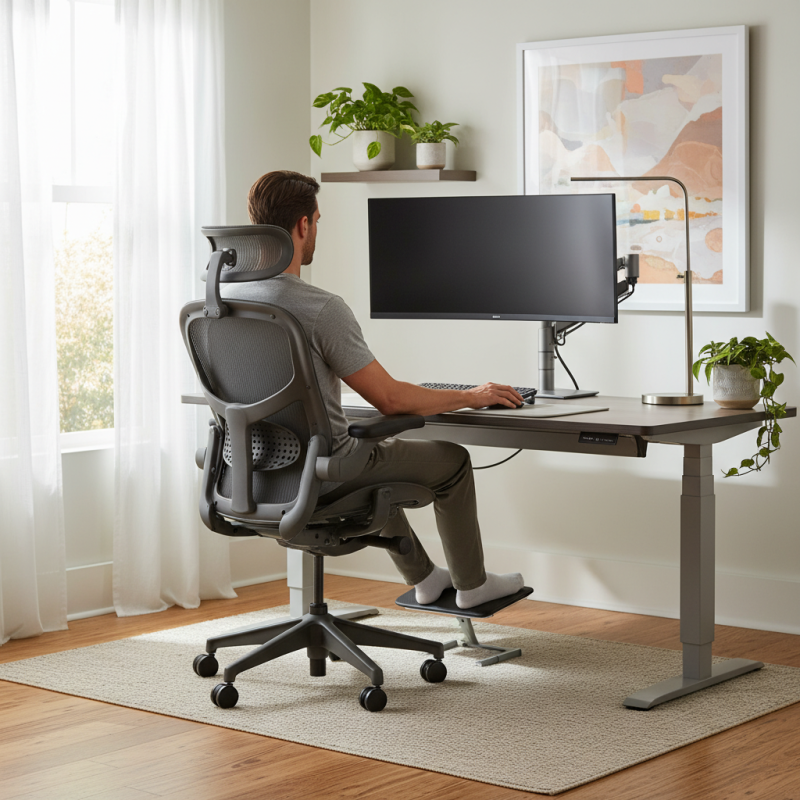
Creating an ergonomic home office is essential for productivity and well-being. Proper ergonomics helps reduce discomfort and prevent long-term injuries. Poor workstation design can lead to back pain, neck strain, and repetitive stress injuries. For many, working from home means long hours at a desk, which increases these risks if the setup is inadequate.
An ergonomic workstation begins with the chair. It should support the lower back and allow for a comfortable seating position. Desks must be at the right height to keep the elbows at a 90-degree angle. The computer screen should be at eye level to avoid straining the neck. Feet should rest flat on the floor or on a footrest. Small adjustments can greatly influence comfort.
It’s easy to overlook the importance of taking breaks. Frequent short breaks can refresh the mind and body. Even shifting positions or walking around helps. If we ignore these factors, discomfort can turn into chronic pain. Reflecting on daily habits in our workspace can lead to better health outcomes and more enjoyable work days. Small changes make a big difference.
| Element | Recommendation | Importance |
|---|---|---|
| Chair | Adjustable height, lumbar support | Supports back posture |
| Desk | Sit-stand option | Encourages movement |
| Monitor | Eye level, arm's length away | Reduces neck strain |
| Keyboard | Ergonomic placement | Prevents wrist strain |
| Mouse | Comfortable design, within reach | Enhances productivity |
| Lighting | Natural light + task lighting | Reduces eye fatigue |
| Footrest | Supports feet when seated | Improves circulation |
Creating an ergonomic home office requires careful consideration of furniture and equipment. Poor posture can lead to long-term health issues. According to a report by the Occupational Safety and Health Administration (OSHA), inappropriate workstation setups contribute to musculoskeletal disorders, which affect approximately 1.8 million American workers each year.
An adjustable chair is a vital component of an ergonomic workstation. It should support the lower back and promote a neutral spine position. A study from the National Institute for Occupational Safety and Health (NIOSH) showed that ergonomic seating reduces discomfort by up to 50%. Additionally, a desk that allows for both sitting and standing can enhance blood circulation and energy levels. Monitor height is crucial too; ideally, the top of the screen should be at or slightly below eye level to minimize neck strain.
Selecting the right equipment extends beyond just furniture. Ergonomic keyboards and mice can significantly reduce repetitive strain injuries. A survey by the Human Factors and Ergonomics Society (HFES) highlighted that users of ergonomic devices report a 30% decrease in discomfort. It’s essential to evaluate your workspace regularly. Adjustments may be necessary as work habits change or as fatigue sets in. Reflection on these aspects can lead to a healthier work environment.
When setting up an ergonomic home office, the desk height and chair adjustments are crucial for comfort and health. A desk that is too high or too low can lead to strain. Ideally, your elbows should be at a 90-degree angle when typing. Your wrists should be straight, not bent awkwardly. Measurements matter; consider the distance from your knees to the desk. A gap here is vital for good posture.
Chair adjustments also play a significant role. Your feet should touch the floor flatly. If your feet dangle, consider a footrest. The chair height should allow for a straight back, offering ample lumbar support. Many forget to adjust the seat depth. A gap of 2-4 inches between the back of your knees and the chair is essential. This setup helps to prevent discomfort during long work hours.
Reflection is important. Over time, what felt right may become uncomfortable. Pay attention to signs of fatigue or stiffness. Adjustments can make a difference. Engaging with your workspace ergonomically will help sustain focus and productivity. A commitment to ergonomics adapts as your needs evolve.
This bar chart illustrates the recommended heights for key components of an ergonomic home office workstation. Proper adjustments to desk height, chair height, monitor height, and footrest height can significantly improve comfort and health while working from home.
Creating an ergonomic home office means paying attention to monitor placement. A significant number of remote workers report discomfort linked to improper setup. According to a study by the American Optometric Association, about 50% of people experience eye strain from extended screen time. This is often due to monitors being positioned incorrectly.
To reduce eye strain, the monitor should be an arm's length away. The top of the screen should be at or slightly below eye level. This position encourages a neutral neck position. Additionally, the screen should tilt slightly backward, which helps reduce glare and promotes comfort. Research indicates that adjusting these simple factors can decrease visual discomfort by up to 30%.
Despite awareness, many still neglect these details. Common issues include screens placed too high or too low. This leads to awkward postures that can result in chronic neck and back pain over time. It's crucial to evaluate your workstation setup regularly. Small changes can significantly impact your work experience and overall well-being.
Lighting plays a crucial role in creating a balanced workspace. Natural light is ideal, enhancing mood and focus. Position your desk near a window if possible. If natural light is limited, choose warm LED lights. They mimic sunlight and reduce eye strain. Proper lighting can also minimize headaches and boost productivity.
Accessories are just as important. A well-placed desk lamp can direct light where you need it most. Incorporate plants to improve air quality and add a pop of color. However, avoid clutter. Too many accessories can lead to distraction. Take time to assess your setup regularly. Not every item will contribute positively.
Consider your chair and desk arrangement. Your workstation should promote good posture and comfort. Evaluate your seating and adjust height if necessary. Small changes can bring big improvements. Reflect on what works best for you. Everyone's ideal setup will differ, so explore and adapt until you find balance.
: Ergonomics enhance productivity and well-being by reducing discomfort and preventing long-term injuries.
Poor design may lead to back pain, neck strain, and repetitive stress injuries over time.
An adjustable chair should support the lower back and promote a seated position that feels comfortable.
A desk at the right height keeps elbows at a 90-degree angle, which aids good posture.
The computer screen should be at eye level to prevent neck strain while working.
Taking frequent short breaks refreshes the mind and body, helping prevent chronic pain.
Natural or warm LED lighting can enhance mood while reducing eye strain and headaches.
Well-placed accessories, like desk lamps and plants, can improve air quality and focus, but avoid clutter.
Regularly evaluate your workspace and make adjustments to improve comfort and posture.
Reflect on your setup and adapt furniture and accessories to find what works best for you.
Creating an ergonomic home office workstation is essential for maintaining comfort and health while working from home. Understanding the importance of ergonomics in workstation design allows individuals to enhance productivity and reduce the risk of strain or injury. Key components include selecting appropriate furniture and equipment, ensuring optimal desk height, and making necessary chair adjustments.
When setting up an ergonomic workstation at home, monitor placement plays a crucial role in minimizing eye strain, while balanced workspace elements such as proper lighting and additional accessories can further enhance the overall environment. By paying attention to these factors, individuals can create a comfortable and efficient workspace that fosters well-being and productivity.

Vant Furniture